Overview
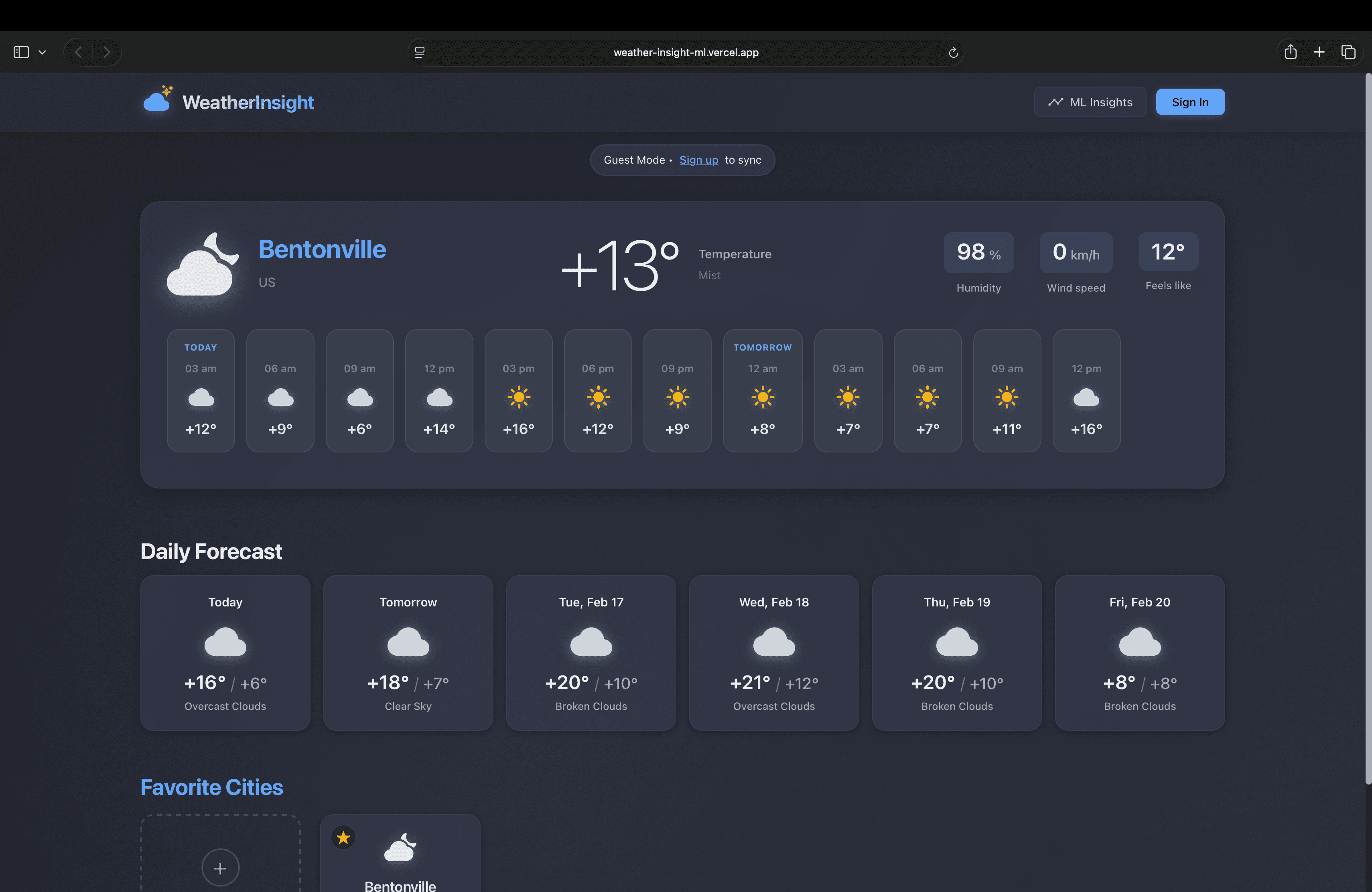
Weather tracking app with machine learning. Built with FastAPI and React to track multiple cities and run ML analysis for anomaly detection, trend prediction, and pattern clustering.
I built this to learn FastAPI and experiment with ML on real data. Weather data is free and complex enough to be interesting.
Architecture
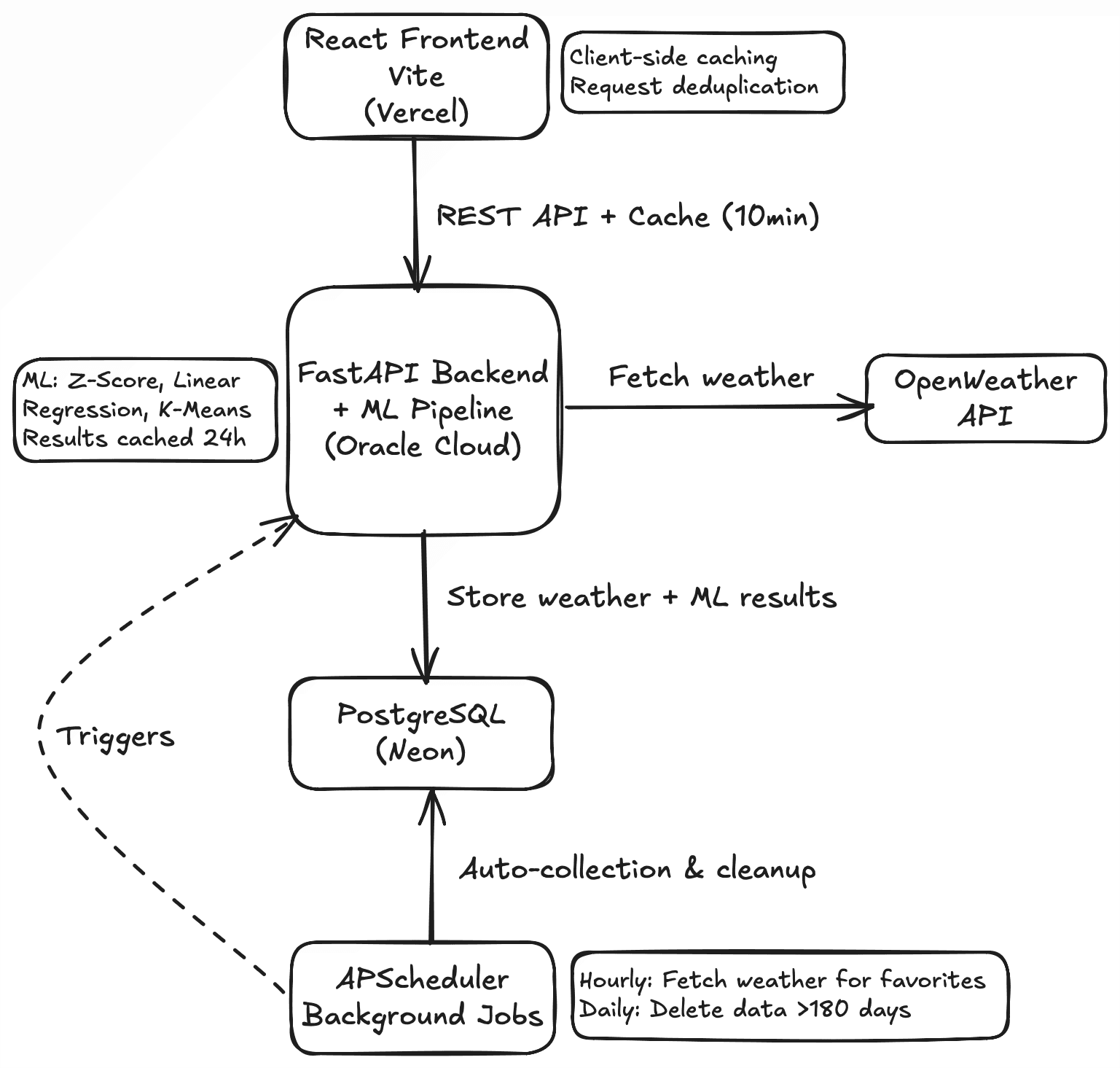
React frontend talks to FastAPI backend, which connects to PostgreSQL and runs ML analysis. APScheduler runs background jobs hourly to collect weather and daily to clean up old data.
Frontend uses client-side caching with 10-minute TTL to reduce API calls. Backend fetches weather from OpenWeather API, stores it in PostgreSQL, and runs ML when users request insights.
ML uses NumPy and Pandas for data processing, then runs Z-Score for anomalies, Linear Regression for trends, and K-Means for clustering. Results cached for 24 hours.
Background jobs run automatically. Hourly job collects weather for all favorited cities. Daily job removes weather data older than 180 days.
Tech Stack
Backend
Database
Frontend
Deployment & APIs
Technical Challenges
APScheduler on Limited RAM
Problem
Hourly weather collection with APScheduler running in-memory crashed the server under load.
Solution
Reduced APScheduler thread pool size. Tuned SQLAlchemy connection pooling. Added 2GB swap. Monitored with PM2.
Impact
Runs reliably every hour. Memory stays under 800MB.
Caching Strategy
Problem
Users check weather frequently. Every request hit the API and database. Slow and wasted API quota.
Solution
Built client-side caching with 10-minute TTL. Custom React hooks check cache before fetching. Request deduplication shares promises for identical requests.
Impact
Dashboard feels instant. API calls dropped 66%.
ML with Limited Data
Problem
ML needs historical data but new cities have none. Cannot show insights immediately.
Solution
Show clear messages when data is insufficient. Hourly collection builds history automatically. Sample data on registration lets users try features.
Impact
Users understand why ML isn't ready yet. Sample data works immediately.
Key Features
What I Learned
FastAPI is Fast: Love the automatic API docs and async support. Type hints catch errors early. Feels more modern than Flask.
APScheduler Needs Tuning: Works well but needs memory optimization. Thread pool size matters when RAM is limited.
Real Data is Messy: APIs return nulls and weird formats. Test data doesn't prepare you for production. Added validation everywhere.
Client Caching Works: 10-minute TTL is a good balance. Request deduplication was surprisingly helpful.
ML is Simpler Than I Thought: Linear Regression and K-Means work well with minimal tuning. Data quality matters more than algorithm complexity.
What I'd Do Differently: Use Celery instead of APScheduler for production. Add rate limiting. WebSocket for live updates instead of polling. Better error messages from day one.